

Shipment
Guidelines for Merchants on how to use the Shipment page in the Muvx panel.
The Shipment page allows Merchants to view and track all shipments created from their connected sources.
It provides filters to quickly view shipments by status:
All, Created, Accepted, Dispatched, Picked Up, In Transit, Delivered, Cancelled, Failed.
Each row in the list includes:
Integration ID, Source, Destination, Shipment ID, Created Date, Status, COD, Last Updated, Action.
From here merchants can monitor shipment lifecycles, review COD (Cash on Delivery) values,
and open shipment details for deeper investigation when needed.
Shipment Details
By clicking on the Action icon, merchants can open the Shipment Details page.
This page provides a full view of the shipment, including:
- Order Summary — order ID, tracking ID, source, destination, notes, payment status, creation date.
- Order Status — timeline showing when the order was created and subsequent status updates.
- Pickup Address — store contact details, phone number, address, coordinates, and map view.
- Delivery Address — customer contact details, phone number, address, coordinates, and map view.
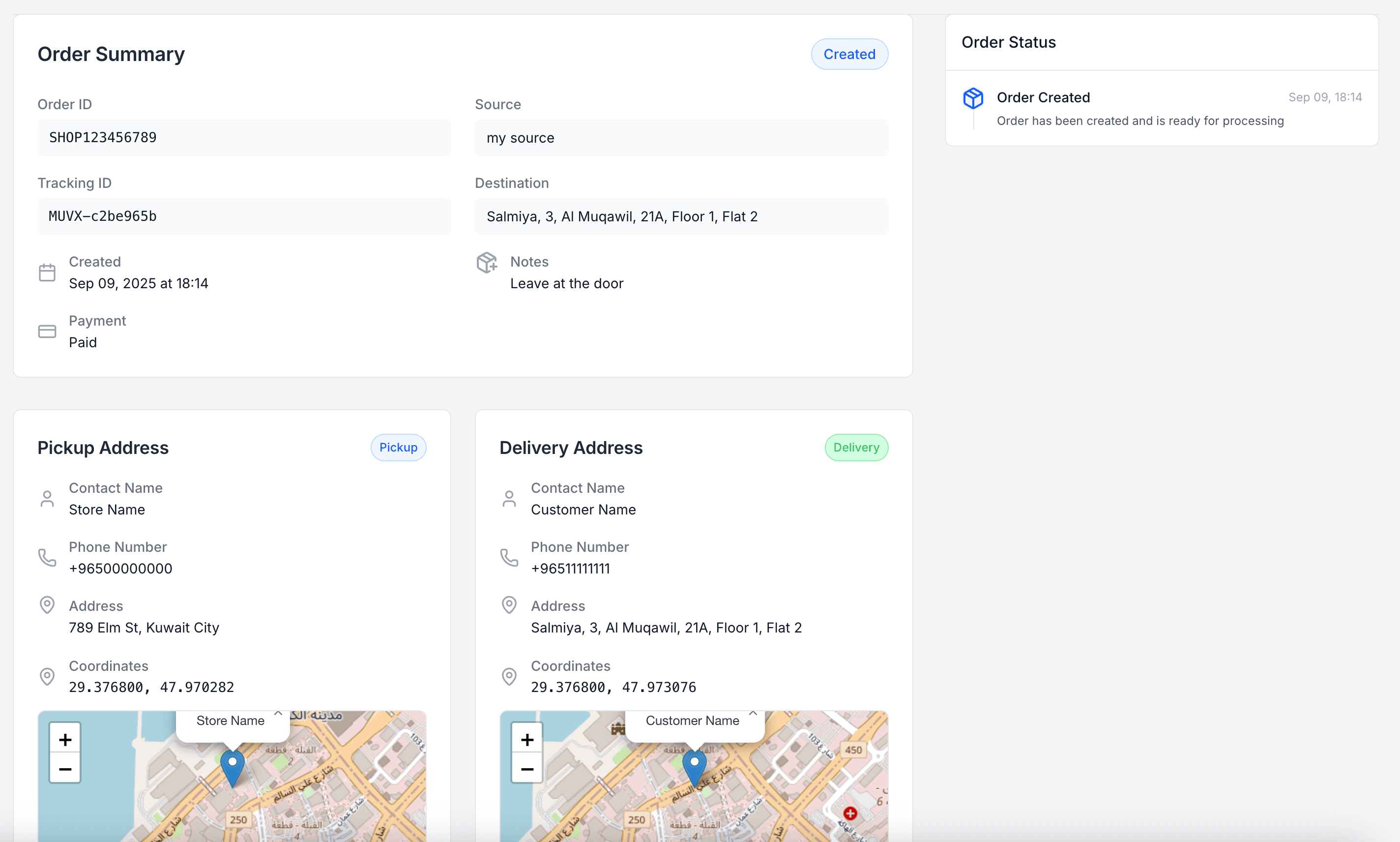
This detailed view helps merchants track shipments more accurately, confirm delivery addresses,
and monitor updates from the delivery provider in real time.