

DocumentationAPI Overview
API Overview
The Muvx API enables online stores to integrate seamlessly with 20+ delivery providers through a single, unified interface.
Instead of managing multiple courier integrations, your system connects to Muvx once — and we handle the complexity behind the scenes.
This low-code, scalable API helps streamline your logistics workflow, reduce technical overhead, and speed up delivery operations.
Order Lifecycle
Below is the typical order status flow:
- created – Order created in Muvx by the shop
- accepted – Accepted by Muvx or assigned to delivery
- dispatched – Courier assigned and dispatched (if supported)
- picked_up – Package picked up from the store (if supported)
- in_transit – On the way to customer (if supported)
- delivered – Successfully delivered
- cancelled – Cancelled (by shop or Muvx)
- failed – Delivery failed (e.g., customer unreachable)
The diagram below illustrates the main order flow and its possible statuses.
For a high-resolution version, you can download the PDF here.
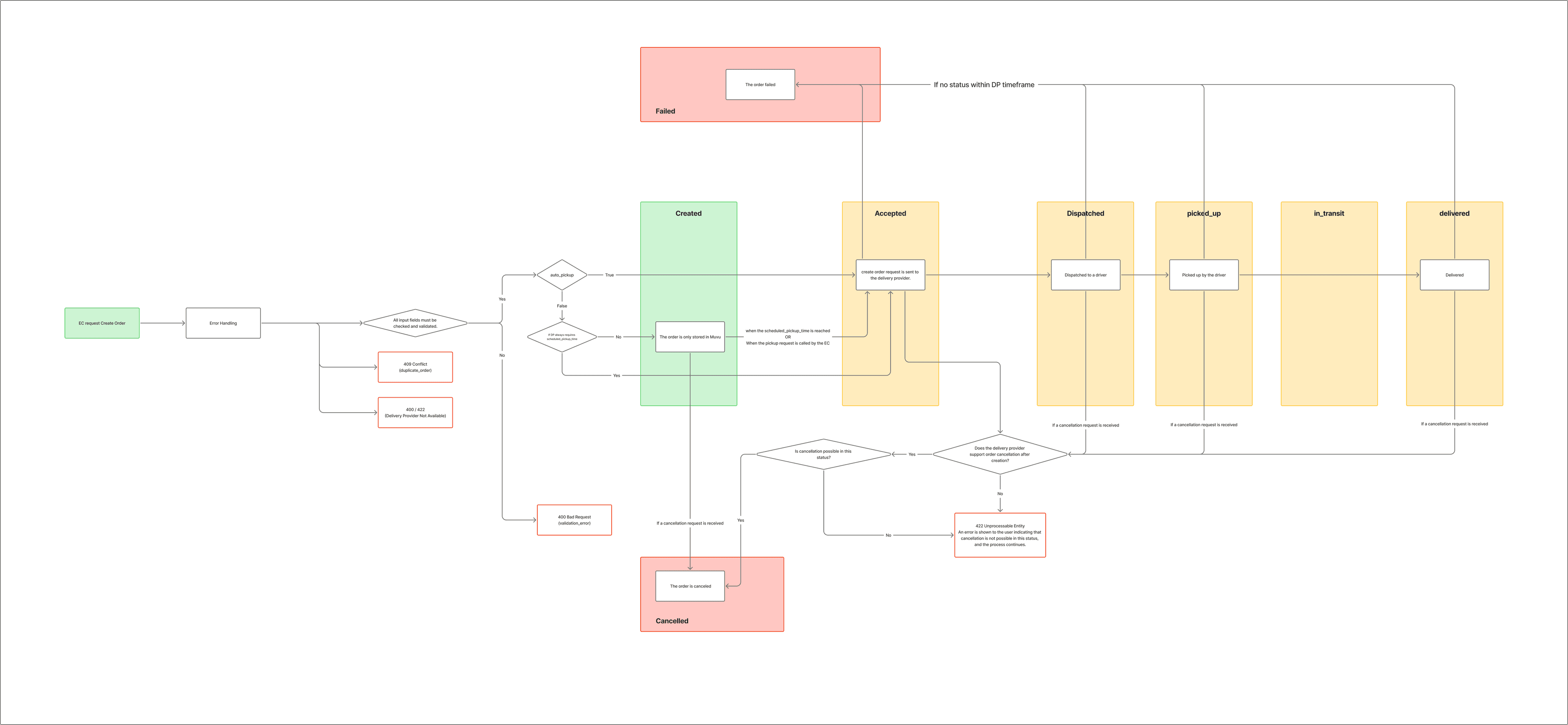
Each status will be reflected in Muvx's system and, optionally, pushed to your system via a webhook.
Updated 6 months ago